Quoted for your insurance agency.
Two options: Calls, or Calls, certificates & inbox. You choose the hours in either one, and our fee is never metered by the call or the minute. You do not need your call counts to ask for a quote.
Thirty minutes with Aiste, our CRO.
The two options
Calls
For agencies whose callers reach voicemail: after hours, when the team is on other lines, or both.
- Answered on your existing number, in the caller’s language.
- Quote requests taken down for a licensed producer. Claim calls go to the right person.
- Anyone who asks for a person is put through, after a check of that person’s calendar.
- A summary of every call in Microsoft Teams or by email.
- Reporting on every call it takes, from your first live call.
Your AMS: Works with or without an AMS. With a supported one, callers are matched and the note is written to the client file.
Quoted for your agency
Request your quote for CallsCalls, certificates & inbox
For agencies where certificates and the service inbox take up your team’s day, as well as the phone.
- Everything in Calls.
- Standard certificates requested by email or text, issued from the policy in your AMS, then sent and logged. Special wording goes to your licensed person. Automatic delivery begins only when you approve it.
- Your shared service inbox sorted, bulk mail cleared, routine replies drafted. Every draft waits in Outlook or Gmail for a person to approve. Nothing sends itself.
- Reporting on the calls, the certificates issued and the emails sorted.
Your AMS: Certificates need a supported AMS. Certificate issuing runs in production on one agency management system today, and switches on only after it passes testing in your own system.
Quoted for your agency
Request your quote for Calls, certificates & inboxIn both options
-
The hours are your choice
When you are closed, when your team cannot pick up, or all day. Covering the calls nobody picks up needs a phone system that can forward them; we check yours before you sign.
-
Setup is included
We guide your call forward, connect a supported AMS if you have one, and set the greeting with you.
What differs between the two.
| Calls | Calls, certificates & inbox |
|---|---|
| Standard certificates of insurance | |
| Not included | Included, with a supported AMS |
| Service inbox and texts | |
| Not included | Included. Drafts wait for your approval |
Everything each option covers, piece by piece
When calls are covered
- Calls
- Your choice: when you are closed, when your team cannot pick up, or all day. Covering the calls nobody picks up needs a phone system that can forward them; we check yours before you sign.
- Calls, certificates & inbox
- The same choice.
Phone calls
- Calls
- Answered on your existing number, in the caller's language. Quote requests are taken down for a licensed producer, claim calls go to the right person, and anyone who asks for a person is put through after a check of that person's calendar.
- Calls, certificates & inbox
- The same.
Your AMS
- Calls
- With a supported AMS: the caller found, the call summary written to the client file, and new callers added as leads. Without one, or before it is connected, nothing is matched or written back; summaries stay in the portal and your alerts.
- Calls, certificates & inbox
- A supported AMS is needed for certificates. The same call matching and notes, plus every certificate logged on the client file. Every read and write is recorded.
Standard certificates of insurance
- Calls
- Not included.
- Calls, certificates & inbox
- A request by email or text is issued from the policy in your AMS, then sent and logged. Special wording goes to your licensed person. You choose whether they start as review copies to your team; automatic delivery begins only when you approve it.
Service inbox and texts
- Calls
- Not included.
- Calls, certificates & inbox
- Your shared inbox sorted, bulk mail cleared, routine replies drafted. Every draft waits in Outlook or Gmail for a person to approve. Nothing sends itself.
Reporting
- Calls
- Every call that reaches InsuraMate: when it came in, how long it ran and how it ended, with the transcript and the recording, when enabled. Only the calls you send it, from your first live call.
- Calls, certificates & inbox
- The same for calls, plus the certificates issued and the emails sorted.
What your team sees
- Calls
- A summary of every call in Microsoft Teams or by email, with the transcript and the recording, when enabled, in the portal. In Teams, one click takes the call-back, so two people never ring the same client.
- Calls, certificates & inbox
- The same, plus a Teams card for each certificate issued or held back for a person.
Setup
- Calls
- Included, no setup fee. We guide your call forward, connect a supported AMS if you have one, and set the greeting with you.
- Calls, certificates & inbox
- Included, no setup fee. We also connect your inbox and test certificates in your own AMS.
What you pay us
- Calls
- Quoted for your agency, month to month. Never metered by the call or minute.
- Calls, certificates & inbox
- Quoted for your agency, month to month. Never metered by the call or minute.
| Calls Calls, with reporting | Calls, certificates & inbox Calls, certificates and the service inbox |
|---|---|
| When calls are covered | |
| Your choice: when you are closed, when your team cannot pick up, or all day. Covering the calls nobody picks up needs a phone system that can forward them; we check yours before you sign. | The same choice. |
| Phone calls | |
| Answered on your existing number, in the caller's language. Quote requests are taken down for a licensed producer, claim calls go to the right person, and anyone who asks for a person is put through after a check of that person's calendar. | The same. |
| Your AMS | |
| With a supported AMS: the caller found, the call summary written to the client file, and new callers added as leads. Without one, or before it is connected, nothing is matched or written back; summaries stay in the portal and your alerts. | A supported AMS is needed for certificates. The same call matching and notes, plus every certificate logged on the client file. Every read and write is recorded. |
| Standard certificates of insurance | |
| Not included. | A request by email or text is issued from the policy in your AMS, then sent and logged. Special wording goes to your licensed person. You choose whether they start as review copies to your team; automatic delivery begins only when you approve it. |
| Service inbox and texts | |
| Not included. | Your shared inbox sorted, bulk mail cleared, routine replies drafted. Every draft waits in Outlook or Gmail for a person to approve. Nothing sends itself. |
| Reporting | |
| Every call that reaches InsuraMate: when it came in, how long it ran and how it ended, with the transcript and the recording, when enabled. Only the calls you send it, from your first live call. | The same for calls, plus the certificates issued and the emails sorted. |
| What your team sees | |
| A summary of every call in Microsoft Teams or by email, with the transcript and the recording, when enabled, in the portal. In Teams, one click takes the call-back, so two people never ring the same client. | The same, plus a Teams card for each certificate issued or held back for a person. |
| Setup | |
| Included, no setup fee. We guide your call forward, connect a supported AMS if you have one, and set the greeting with you. | Included, no setup fee. We also connect your inbox and test certificates in your own AMS. |
| What you pay us | |
| Quoted for your agency, month to month. Never metered by the call or minute. | Quoted for your agency, month to month. Never metered by the call or minute. |
See every call it takes, and how it ended.
The portal lists every call that reaches InsuraMate, with when it came in and how long it ran. Each one shows how it ended: handled on the call, put through to your team, a transfer nobody picked up, or a caller who hung up. The transcript and the recording, when enabled, sit with each one. On Calls, certificates & inbox it also shows the certificates issued and the emails sorted.
It counts from your first live call, and only the calls you send it. If only after-hours or overflow calls come to InsuraMate, those are the calls in the report. It cannot see calls from before, or calls that never reach it.
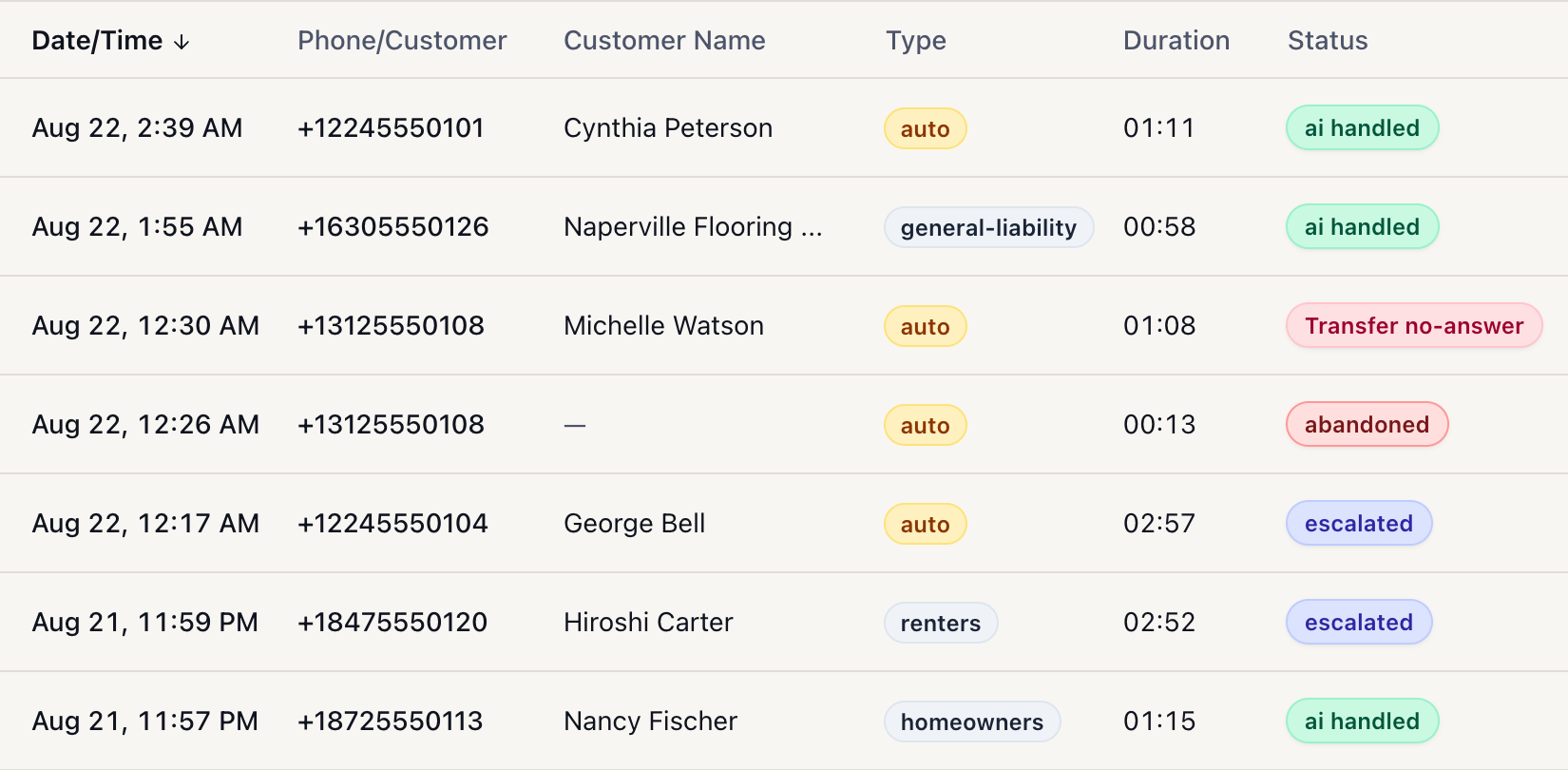
Swipe the list to see how each call ended.
What you are signing up for.
These are the standard terms in every InsuraMate proposal and services agreement. Yours sets them out in writing before you sign anything.
What you pay us
- Your first month, paid when you sign. It covers your first month live, which starts on your go-live day.
- Then one monthly fee, quoted for your agency. Never metered by the call, the minute or the add-on.
- No setup fee, no charge for connecting your AMS, and no overage.
What others bill you
- Twilio, for your calls. The account is in your agency’s name, and we guide you through opening it. Twilio bills you directly at its published rates, and we take no margin. That bill is usage based: it rises with call volume, transfers and texting, even though ours does not. If you use texting, it also needs a one-time carrier registration.
- Possibly your AMS vendor. Depending on your system and plan, it may charge for the user account or API access the connection uses.
- Your existing providers. Your phone carrier, AMS and email accounts stay with your current providers.
- Month to month
- No minimum term and no annual commitment. Stop at any time and pay only through the month in progress.
- If we cannot get you live
- The first payment is refunded in full if you do not reach go-live for reasons on our side. It is also refunded in full if you change your mind within seven days of signing, before onboarding work starts. Otherwise it counts as your first month.
- When you leave
- We export your records to you and delete our copies within 30 days, apart from what the law requires us to keep and routine backups rolling off.
Read the full standard terms
- When you start paying
- The first month’s fee is paid when you sign, and it covers your first month live. That month starts on your go-live day, the day your first live call runs through InsuraMate. Nothing more is billed until a month after go-live, and setup is never billed on its own.
- How long you are committed
- Month to month. There is no minimum term and no annual commitment. You can stop at any time and pay only through the month in progress.
- If we cannot get you live
- If you do not reach go-live for reasons on our side, the first payment is refunded in full. It is also refunded in full if you change your mind within seven days of signing, before onboarding work starts. Otherwise it counts as your first month, earned against the onboarding already done.
- If it does not work as agreed
- Automatic certificates and AMS updates switch on only after they pass testing in your own system. If the service is not performed substantially as your proposal describes, we redo the affected work or, where that is not possible, refund the fees for the period affected. And you can stop at the end of any month.
- When you leave
- We export your records to you and delete our copies within 30 days, apart from what the law requires us to keep and routine backups rolling off. Your phone numbers and your Twilio account stay yours throughout, and you can pull the call forward back yourself at any time.
Three steps to live.
-
Step 1: Request a quote
Tell us which option, which hours and which AMS you run. We reply by email, and ask if anything about your systems needs confirming before we can put a number in writing.
Or book the call: your price comes in writing the same day, for the option and systems confirmed on it.
-
Step 2: Confirm your needs, get a written offer
We confirm the option, the hours, and where your AMS stands for each piece of work. A proposal and services agreement then set out the scope, the timing and the terms. Nothing touches your systems before you sign.
-
Step 3: Setup, testing, and your approval
You pay the first month when you sign. Calls go live when you approve the agreed test cases and routing, and your first live call starts your first paid month. Automatic certificates and AMS updates switch on only after they pass testing in your own system.
Setup and testing usually take about two weeks once we have your access and information. Waiting on a vendor or a carrier registration adds to it.
Every step in detail, what your team provides, and what the call covers
-
Step 1: Scope and compatibility confirmed
Us, with you, before you sign
Which option, which hours, and where your AMS stands for each piece of work. Anything that depends on your AMS vendor has its timing agreed before you sign, and if you run a system we are not live on, we say plainly whether it can be connected before you count on it.
-
Step 2: Your access and your rules
Your team, a few hours in total
You set the call forward and open a Twilio account in your agency’s name, both with our guidance, and give access to your AMS and inbox. You send your hours, routing, scripts and rules. The full list is below.
-
Step 3: Configured and tested
Us, with your team
We set up the routing, the greeting and your rules, then test them against your actual workflow. Your existing phone lines and office routine keep running untouched while we do.
Usually about two weeks once we have your access and information. Waiting on a vendor or a carrier registration adds to it.
-
Step 4: You approve go-live
You
Calls go live once you approve the agreed test cases and routing, on the hours you choose. Evenings, weekends and overflow first if you prefer. Your first live call starts your first paid month.
-
Step 5: Live, reviewed, then wider
You decide each step
On Calls, certificates & inbox, once your AMS connection passes testing, you choose whether certificates start as review copies to your own team, not the requester. You set the conditions, and automatic delivery begins only when you approve it. You widen the hours when you are ready.
If you choose review copies, there is no fixed length: the review ends when you approve, not on a date.
What your team provides during setup
- The call forward on your phone system, with the transfer destinations and fallback rules.
- A Twilio account in your agency’s name. We guide you through it.
- If you have a supported AMS, access to it in the way agreed for your system, such as a named user you create and control.
- On Calls, certificates & inbox: consent for your service mailbox through Microsoft’s or Google’s own screen, and a carrier registration if you use texting.
- Your hours, staff and routing lists, scripts, FAQs and certificate rules.
- Approval of the greeting and the disclosure callers hear, and the name of the person who approves changes.
If you book the call
Thirty minutes with Aiste, our CRO.
Bring
- Which AMS you keep client records in.
- Who answers the phone today, and where calls go when nobody can. No call counts needed.
- What takes up your team’s time: certificates, the service inbox, the phone.
We cover
- Which option fits the work you described.
- Where your AMS stands for each piece of work, live or in rollout.
- What stays with your team, and how the rollout would run.
- A look at our demo workspace. The names are sample data and the product is the same. Nothing touches your own systems before you sign.
You leave with
- Your price in writing the same day, for the option and systems confirmed on the call.
- Then a proposal and services agreement that set out the scope, the timing and the terms above.
- No obligation. The call commits you to nothing.
How InsuraMate connects to your phone, your AMS and your inbox: How it works.
Questions about the bill.
Why does this cost more than an answering service?
Sometimes it does, and the honest answer is that it is not the same purchase. Those services are good at what they sell, and on their AI tiers some of them are cheaper than us: Smith.ai books appointments and qualifies leads, Abby Connect schedules and transfers. What you buy from them is the conversation. What you buy from us is what happens around it: the client matched on the policy of record in your AMS, the note written to the file, the standard certificate issued off a written request, and the service inbox worked. Price the whole job rather than the talk time. And whatever they charge, their bill moves with your volume in renewal season and ours does not.
Compare us with each serviceIs there a minimum agency size?
No. Small agencies are welcome on either option, and you can start with Calls alone. Every agency is quoted for its own situation.
Can I start small and add the rest later?
Yes. You can start with Calls on only the hours you are closed, which is a low-risk way to see how it handles your callers, then widen the hours when you are ready. Moving to Calls, certificates & inbox keeps your phone setup as it is and adds the inbox and certificate setup on top.
Do I still need to hire, or can I cut a salary?
Neither is the point. Nobody is made redundant, and your payroll does not drop when you switch this on. What changes is what your licensed people spend the day on: the certificates, the after-hours calls and the inbox sorting come off their desks, and the hours go back to renewals, remarketing and the clients who need a licensed person. Whether you need the next service hire to keep growing is a decision you make with those hours in hand.
Do I get a discount if I prepay annually?
We'd rather you stay because it's working. If you want to prepay a year, ask, and we'll work something out.
What the answering services cost, worked out
Five services at two call volumes, from their own published rates
They meter you, so what they cost depends entirely on how much of your phone you hand them. Here are the same five vendors at both volumes, each on the cheapest combination of a published plan and that same plan's own published overage rate. Rates come from each vendor's own pricing page, re-checked 28 September 2026, except Abby Connect's overage rates, which it publishes as a table in its terms and conditions. Every line shows the arithmetic so you can redo it.
Two things to know before you read across the rows. They do not meter the same unit. Smith.ai bills per call, so talk time does not move its figure at all. PATLive bills per minute. AnswerConnect bills interactions rounded up to the whole minute. Abby Connect bills “Abby Minutes”, where a minute answered by its AI costs half a minute. Ruby bills receptionist minutes, which include hold time and the write-up after the caller hangs up, so a month of calls cannot be converted into Ruby’s unit from anything Ruby publishes, and both its rows say so. And two of them sell AI as well as people. Smith.ai publishes a separate AI receptionist card an order of magnitude below its live-agent one. Abby Connect sells both on one set of plans, where a minute answered by AI costs half an Abby Minute. Both are priced here on that cheaper AI side, with the all-human figure given in the same row. PATLive states it is 100% human. Ruby and AnswerConnect answer with people, Ruby with optional AI enhancements on top. One more thing about Abby: its terms count ring, talk and transfer time, exclude hold time, and round each call up to the next 30 seconds, so a real Abby bill runs above the talk-time arithmetic here.
Cover the hours you are closed
About 100 calls a month, roughly 300 minutes
| Abby Connect | $493.50 Plan + overage |
|---|---|
| Priced all-AI. 300 elapsed minutes is 150 Abby Minutes, so the $329 plan (100 Abby Minutes) plus 50 more at its published $3.29 overage. All-human would be 300 Abby Minutes: the $599 plan plus 100 more at its published $2.99, or $898 | |
| PATLive | $479 Published plan |
| Their 300-minute plan, with no overage needed | |
| AnswerConnect | $395 Published plan |
| Their 300-minute plan, no overage needed. Their card badges this tier "no setup fee" while its own fine print says all plans carry $49.99 | |
| Smith.ai | $212.50 Plan + overage |
| Their AI receptionist card: $150 for 75 calls, plus 25 more at that tier’s own $2.50. The same month on their live-agent card is $915 | |
| Ruby Receptionists | Quote required Not published |
| Ruby bills receptionist minutes, not talk time: hold time and the write-up after the caller hangs up count, talk time after a transfer does not, and every call rounds up to a full minute. A month of calls cannot be converted from anything Ruby publishes | |
Cover the whole day
About 600 calls a month, roughly 1,800 minutes
| PATLive | $2,851 Plan + overage |
|---|---|
| 1,000-minute plan, $1,499, plus 800 minutes at that plan's own $1.69 | |
| AnswerConnect | $2,580 Plan + overage |
| 1,500-minute plan, $2,025, plus 300 minutes at $1.85. Their one-off $49.99 setup fee is not in this figure | |
| Abby Connect | $2,484 Plan + overage |
| Priced all-AI. 1,800 elapsed minutes is 900 Abby Minutes, so the $1,380 plan (500 Abby Minutes) plus 400 more at its published $2.76 overage. All-human would be 1,800 Abby Minutes, or $4,968 the same way, and their Enterprise tier prices the same $2.76 | |
| Smith.ai | $1,010 Plan + overage |
| Their AI receptionist card: $800 for 500 calls, plus 100 more at that tier’s own $2.10. The same month on their live-agent card is $4,650 | |
| Ruby Receptionists | Quote required Not published |
| Their largest published plan is 500 receptionist minutes. Their Terms of Use confirm overage is charged above it, but publish no rate for it | |
Published plan is a price straight off their rate card. Plan + overage is that plan's price plus its own published overage rate, worked out in the row. Not published means the month cannot be priced from what the vendor prints, so the only honest answer is that you would have to ask them. None of these figures is a quote any vendor gave us. Three minutes a call is assumed throughout, which moves four of the five rows and leaves Smith.ai untouched, because it bills by the call. And none of it is a like-for-like with what we do, because talk time is not the work.
Ours ends inside your AMS.
On a supported system the call ends with the client matched on the policy of record and the note already written, as set out under “Will it work with my AMS?” above. That is the comparison worth making, and it has a size. We measured the whole job around a call at a live agency and it came to just over six minutes, most of it after the caller hangs up: finding the client, matching the policy of record, writing the note into the AMS. That is our own measurement of our own work, not a claim about what anyone else leaves undone. Several of the services above advertise call summaries and CRM sync, so the question to put to them is not whether anything is written back, but where it lands, on which policy, and whether they can show you.
What the services above can do inside your systems is a fair question, and the place to put it is to them. Smith.ai's insurance page says Applied Epic, AMS360 and EZLynx integrate directly; the others name no agency management system among their published integrations, which is not the same as saying they cannot reach one. Ask each of us what it writes back, and ask to see it.
Ready to see your number?
Request your quote in two short steps, with no call counts needed. Or book the call, and have your price in writing the same day.
Thirty minutes with Aiste, our CRO.